
Phone Repair
Phone Repair Preston | Trusted Local Repairs at CallCabin
Need phone repair in Preston? CallCabin offers fast, reliable service for phones, tablets, and more. Affordable repairs for all your tech needs in Lancashire.
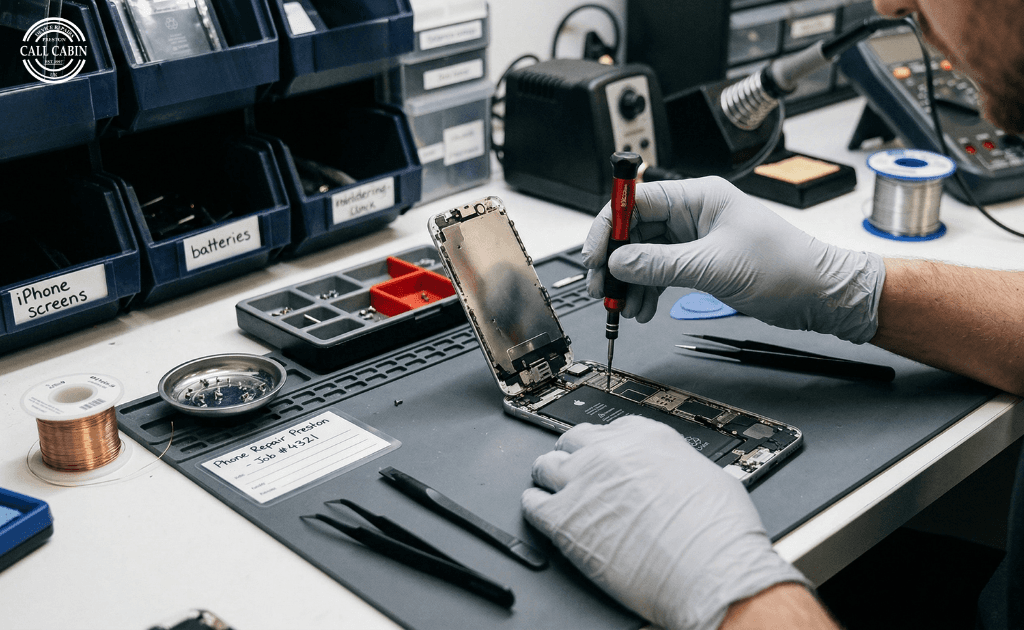
Why Choose CallCabin for Your Phone Repair in Preston?
When your phone breaks, you want a repair service you can trust someone who can get the job done quickly and effectively. That's where CallCabin comes in. Located right here in Preston, we specialize in phone repairs for a wide variety of devices, ensuring that you get the best service without the hassle. Whether it's a cracked screen, battery issues, or software problems, CallCabin has got you covered.
What sets us apart? First and foremost, we pride ourselves on providing reliable, expert service at affordable prices. Our experienced technicians work quickly, with most repairs completed in a timely manner, so you don't have to be without your phone for long. We're also locally based, meaning you're not just another customer you're part of the CallCabin family, and we treat you as such.
At CallCabin, we understand that your phone is an essential part of your daily life. That's why we go above and beyond to ensure your device gets the best care possible. Plus, with our friendly, approachable team, you'll feel comfortable throughout the entire repair process.
Ready to get your phone fixed? Contact us today, and experience the CallCabin difference!
Common Phone Problems You Might Encounter
Phones are an essential part of daily life, but like any device, they can encounter problems over time. Some issues are common and can be easily fixed, while others may require professional help. Here are a few of the most frequent problems you might experience with your phone:
Cracked or Shattered Screen
One of the most common issues, a cracked screen can happen in an instant. Whether it’s a small crack or a completely shattered display, it can make your phone hard to use. A damaged screen can also lead to more serious issues, like affecting the touch functionality, so it’s important to get it repaired quickly.Battery Drain
If your phone’s battery drains too quickly or doesn't hold a charge, it might be time for a replacement. Battery wear is natural over time, but constant charging cycles can lead to faster degradation. If your phone's battery life is a constant issue, it's worth looking into a professional battery replacement.Overheating
If your phone overheats while charging or when using apps, it could be due to a faulty battery or a software issue. Overheating can lead to further damage if left unchecked, so it’s best to get it looked at sooner rather than later.Unresponsive Buttons or Screen
If your phone's buttons stop responding, or the touch screen doesn’t register inputs, it could be due to dirt buildup, a software glitch, or a hardware issue. This can be especially frustrating, as it may render your phone difficult to operate.Slow Performance
Phones can start to feel sluggish over time, especially if you have many apps running or storage space is running low. While some of this can be resolved with a simple restart or by clearing out apps, in some cases, it could indicate a deeper issue with the software or hardware.Camera Not Working
A malfunctioning camera can affect your ability to take photos or video calls, which are critical features for most phone users. This could be due to a broken lens, software issues, or a faulty connection.Charging Port Issues
A damaged or clogged charging port can prevent your phone from charging properly or at all. If your charging cable is loose or doesn't stay connected, there may be an issue with the port itself that requires repair.
If you're dealing with any of these issues, CallCabin is here to help. Our team can quickly diagnose and repair your device, ensuring it’s up and running again in no time. For more serious problems, professional repair is often the safest and most reliable option. Contact us today to schedule your repair!
When to Seek Professional Help for Phone Repairs
While some phone issues can be fixed at home with a quick restart or a cleaning session, there are times when it’s best to seek professional help. If you're experiencing any of the following problems, it may be time to leave the repair to the experts at CallCabin:
Severe Cracks or Shattered Screens
A cracked or shattered screen may look like a minor cosmetic issue, but it can affect the phone's functionality. In some cases, broken glass can lead to cuts or further damage to internal components. If your phone's screen is severely damaged, it's best to get it repaired as soon as possible to avoid further complications.Water Damage
Accidental spills or drops in water can cause significant internal damage that may not be immediately apparent. Even if your phone seems to be working fine initially, water can corrode internal parts over time, leading to permanent damage. Professional repair shops like CallCabin have the expertise to assess and repair water damage.Battery Replacement
If your phone’s battery drains quickly or doesn’t hold a charge, it might be time for a replacement. Replacing the battery on your own can be tricky and risky, especially for modern phones that require special tools and techniques. A professional repair ensures the job is done safely, and with a high-quality battery.Faulty Internal Components
If your phone is overheating, experiencing issues with internal components like the motherboard or processor, or if it’s not turning on at all, it’s best to seek professional help. These kinds of problems usually require specialized tools and skills to diagnose and fix.Complex Software Problems
If your phone is running slowly, crashing often, or having issues with apps, it could be due to a software glitch. While some problems can be fixed with a reset or update, others might require professional troubleshooting, especially if the issue involves corrupted files or a malfunctioning operating system.Unresponsive Buttons or Touch Screen
If your phone’s buttons or touch screen aren’t responding despite troubleshooting, the problem might lie in the hardware. A professional repair can fix damaged or faulty buttons, as well as issues with the touch screen’s sensitivity.When Warranty or Insurance Coverage is Needed
If your phone is still under warranty or you have phone insurance, it's important to follow the proper procedures for repairs. Many warranties and insurance policies require that repairs be done by certified professionals to avoid voiding coverage.
Professional repair services offer the expertise and tools necessary to address these issues properly. At CallCabin, our team of skilled technicians can handle everything from cracked screens to internal component repairs, ensuring your phone is restored to its best condition. Don’t risk causing further damage contact us today and let us help you get your phone back in working order. Book a repair with CallCabin now!
How Long Will Phone Repair Take and What Are the Costs?
When your phone is damaged, one of the first things you probably want to know is how long the repair will take and how much it will cost. At CallCabin, we understand that time and money are important factors, so we strive to offer both quick and affordable services.
Repair Time
The time it takes to repair your phone can vary depending on the type of issue. For example:
Screen repairs usually take between 1-2 hours, depending on the model and the severity of the damage.
Battery replacements can take around 30-60 minutes.
Water damage repair or internal component repairs may take longer, anywhere from a few hours to a day, depending on the complexity.
We always aim to get your phone back to you as quickly as possible, but if we need to order any parts or carry out a more in-depth repair, we’ll keep you informed about the timeline.
Repair Costs
The cost of your repair will depend on the type of service required. Some of our general pricing examples include:
Screen repair: Prices typically range from £60 to £150, depending on the phone model.
Battery replacement: Generally costs between £30 to £70.
Motherboard or internal component repairs: These can vary widely, from £80 to £200 or more, depending on the damage and parts required.
At CallCabin, we pride ourselves on being transparent about our pricing. We’ll always provide a clear quote upfront, and there are no hidden fees. We also offer competitive pricing to ensure that you get the best value for your repair.
Additional Factors
There are a few factors that may influence the time and cost of repairs:
Model of the phone: Some phones, especially newer models or less common brands, may require special parts or more time to repair.
Severity of the issue: More complex repairs, such as water damage or motherboard issues, can take longer and be more costly.
If you’re worried about costs, don’t hesitate to reach out to us for a free estimate. We offer affordable solutions for a wide range of phone problems, and we’ll do our best to find the most cost-effective way to get your device working again.
Ready to get your phone repaired? Book a repair with CallCabin, and we’ll get you back to using your device in no time!
Simple Phone Fixes You Can Try at Home
Before you rush to a repair shop, there are a few simple fixes you can try yourself to see if you can resolve minor issues with your phone. While these DIY solutions won’t work for everything, they can save you time and money if the problem is something small.
1. Restart Your Phone
One of the easiest fixes for a slow or unresponsive phone is a simple restart. Restarting your phone can help clear any software glitches, close unnecessary apps, and refresh the system, giving your phone a clean start. If your phone is frozen or apps are crashing, this might be all it takes to get things running smoothly again.
2. Clear Cache and Storage
Phones can start to slow down when storage fills up or when too many apps accumulate cache data. Try clearing the cache in your apps or deleting unnecessary files. If your phone is running low on storage, offload photos, apps, and videos you no longer need or back them up to the cloud.
3. Check for Software Updates
Sometimes, performance issues are related to outdated software. Go to your phone's settings and check if there are any available updates. Updating to the latest version of your phone’s operating system can fix bugs, improve performance, and enhance security.
4. Fix Minor Charging Issues
If your phone isn't charging properly, try cleaning the charging port with a soft brush or compressed air. Dust, lint, or dirt can get stuck in the port, preventing the charger from making proper contact. Make sure you're using the correct charger and cable as well.
5. Adjust Screen Brightness and Settings
If your phone’s screen is flickering, it could be due to automatic brightness settings or certain accessibility features. Try adjusting the brightness manually or turning off features like adaptive brightness or battery saver to see if that resolves the issue.
6. Reset Network Settings
If you’re having trouble with Wi-Fi, Bluetooth, or cellular connections, resetting your network settings might help. This will clear any saved Wi-Fi networks and Bluetooth connections, allowing you to reconnect to them fresh. Just make sure you know your Wi-Fi password before you do this!
7. Try a Soft Reset for Unresponsive Buttons
If your phone’s buttons are not responding, a soft reset may fix it. For most phones, pressing and holding the power button for about 10 seconds will force a reset without causing any data loss. This can help if the buttons or the screen are frozen.
8. Check for Physical Damage
Sometimes, the issue could be something as simple as a loose case or screen protector that's affecting functionality. Remove the case and check if your phone's performance improves. If your screen looks damaged or cracked, it’s best to seek professional repair, but a clean surface might also help resolve touch sensitivity problems.
While these fixes can address simple issues, some problems like a broken screen or internal hardware failure will need professional attention. If your DIY efforts don’t fix the problem, don’t hesitate to reach out to CallCabin for a quick and reliable repair service.
Ready for a professional fix? Contact us and let us handle the rest!
Prevent Future Damage: Tips to Keep Your Phone in Top Condition
Once you’ve had your phone repaired, it’s important to take steps to prevent future damage and keep it running smoothly for as long as possible. Here are some simple tips to help you avoid common issues and maintain your phone’s condition:
1. Use a Case and Screen Protector
A good quality case and screen protector can be your phone's best defense against drops, bumps, and scratches. Invest in a sturdy case that offers both drop protection and grip. A screen protector will help prevent scratches and cracks, especially if you tend to keep your phone in your pocket or bag with other items.
2. Keep Your Phone Clean
Dirt, dust, and oils from your fingers can build up on your phone over time, affecting performance and even causing damage. Regularly wipe your phone with a microfiber cloth to keep the screen and back clean. Pay special attention to the charging port, speakers, and buttons, as dust can cause charging issues or affect performance.
3. Avoid Extreme Temperatures
Extreme heat or cold can have a negative impact on your phone’s battery and internal components. Avoid leaving your phone in direct sunlight, in a hot car, or in freezing temperatures. Try to keep your phone within the recommended temperature range, typically between 0°C and 35°C (32°F and 95°F).
4. Charge Your Phone Correctly
Overcharging or letting your phone's battery run down to 0% constantly can shorten its lifespan. Aim to charge your phone when it reaches about 20-30% and unplug it once it hits 80-90%. Use a quality charger and avoid using cheap, non-certified charging accessories, as they can damage the battery over time.
5. Install Updates Regularly
Phone manufacturers often release software updates to fix bugs, enhance performance, and improve security. Keep your phone’s software up to date to ensure it runs smoothly and stays protected from vulnerabilities. Set your phone to update automatically or check for updates manually on a regular basis.
6. Avoid Water Exposure
Although some phones are water-resistant, it’s always best to keep your phone away from water. Avoid using your phone in the rain, at the beach, or near pools, and never submerge it in water unless it’s designed to be waterproof. Even small amounts of water exposure can lead to internal damage that’s difficult to repair.
7. Use Battery Saver Mode
If your phone’s battery drains too quickly, consider using the battery saver mode, especially if you don’t need full power. This will limit background apps and notifications, extending your battery life and reducing wear on your phone’s components.
8. Be Mindful of App and Storage Management
Having too many apps running in the background or a full storage drive can slow down your phone. Regularly delete unused apps, clear your cache, and move photos and files to cloud storage to free up space and improve your phone’s performance.
By following these simple preventative measures, you can significantly extend the lifespan of your phone and avoid common issues that require costly repairs. Taking a little extra care will not only keep your phone looking great but also help it run smoothly for years to come.
If you do encounter problems despite taking good care of your device, CallCabin is always here to help with reliable and affordable repairs. Ready to book your repair? Contact us today!
Book Your Phone Repair with CallCabin Today
At CallCabin, we understand how important your phone is to your daily life. Whether it’s a cracked screen, a slow battery, or a more complex issue, we’re here to help. Our expert technicians in Preston provide reliable and affordable phone repair services, ensuring your device is back to working like new in no time.
No need to stress about finding a local, trustworthy repair shop CallCabin is just around the corner. We offer a fast turnaround time, transparent pricing, and a personal touch that makes all the difference. Plus, our team is dedicated to making the repair process as easy as possible for you.
Whether you need a quick screen fix, a battery replacement, or a more complicated repair, CallCabin is your go-to solution. Our team uses high-quality parts and the latest repair techniques to ensure your phone is fixed correctly and efficiently. We also offer a range of services for other devices, such as laptops and tablets, so you can trust us with all your tech repairs.
Don’t let phone problems slow you down. If your phone is in need of repair, contact us today to schedule your appointment. Our friendly team is here to assist you with any questions you might have, and we’ll ensure a smooth, stress-free repair experience.
Ready to get your phone fixed? Book a repair with CallCabin and get back to what matters most your day!
It seems this is the final section of the blog, so I’ll reiterate the closing with a friendly call to action to wrap it up:
Why Trust CallCabin for Your Phone Repair in Preston?
At CallCabin, we don’t just fix phones we bring peace of mind. With our professional, reliable, and affordable repair services in Preston, we’re dedicated to getting your phone back to its best, fast. Whether it's a simple fix or a more complicated issue, our experienced technicians are here to help you every step of the way.
We pride ourselves on our transparency, so you'll always know what to expect when it comes to pricing and timeframes. We understand how important your device is to you, which is why we handle every repair with care and precision. And with our quick turnaround times, you won’t have to be without your phone for long.
So, whether you’ve cracked your screen, need a battery replacement, or are dealing with a technical issue, CallCabin has got you covered. Don’t wait get your phone fixed today and avoid bigger issues down the road.
Book your phone repair with us now and enjoy the peace of mind knowing that your device is in good hands. Contact us today to get started.
Related Posts
Phone Battery Replacement Preston | Signs & Repair Cost
Learn when phone battery replacement Preston is needed, what causes fast battery drain, repair options, safety risks and when to replace your battery.
Cracked iPhone Screen Repair | Preston Repair Guide
Need cracked iPhone screen repair? Learn the risks of using a broken screen and when local Preston repair is the safer option for your device.
Water Damaged Phone Repair Preston | Immediate Step Guide
Dropped your phone in water? Learn the immediate steps to take, myths to avoid, and how professional water damaged phone repair in Preston saves your data.
Comments
Share your thoughts. Your comment will appear after review.
